TFX MT4 Trade Manager EA is one of the most powerful and user-friendly trade management tools available for MetaTrader 4. It combines a fast, single-click trade execution system with an accurate Lot Size Calculator and Risk-Reward Calculator—allowing traders to set precise Stop Loss (SL) and Multiple Take Profits (TP) with ease.
Designed for professionals, the TFX Trade Manager includes an intuitive Trade Management Panel, Account Exposure Monitoring, and a suite of advanced features—all in a single, collapsible, and fully moveable interface. It offers true one-window operation, from trade entry to order management, without cluttering your chart.
Whether you’re a scalper or a swing trader, this EA is built for speed, precision, and simplicity—developed by professionals, for professionals.
Full Mode
Compact Mode
■ Click the Minimize button to switch to Compact Mode for a cleaner, space-saving interface.

Hide Toolbar
■ Double-click the TFX logo to completely Show or Hide the toolbar.
Risk Management
■ Calculate lot size using risk percentage input.
■ Calculate lot size using fixed amount input. [Click the “Risk %” label to toggle between % and Amount]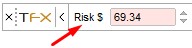 ■ Calculate risk by lot size input using either percentage or amount.
■ Profit calculation based on the number of targets or trade scaling.
■ Lock or unlock the risk/reward ratio during calculations for flexibility.
■ Easily adjust the risk/reward ratio using the intuitive Risk/Reward GUI tool.
■ Perform calculations in both points and pips.
Divide Trade into Multiple Targets
■ Easily split your trade into multiple profit targets.
■ Use hotkeys (Ctrl + 1/2/3) for quick and efficient trade division.
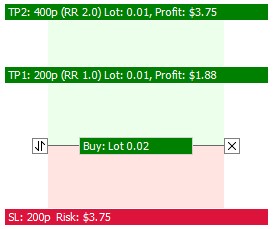
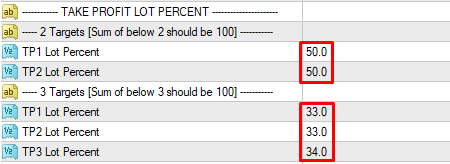
Set Lot Percentage for Multiple Targets
■ Select the Lot % for each individual target.
■ Press F7 to open the options window and adjust settings.
Hide Monetary Values
■ Easily hide all monetary values from the Main Toolbar and Visual Trade Tool through Input Options.
(Press F7 to access settings.)

One-Click Order Entry
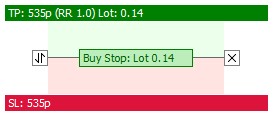
■ Execute orders instantly with a single click using the intuitive Risk/Reward GUI tool.
■ Effortlessly select and switch between Market, Limit, and Stop orders directly within the Risk/Reward interface.
■ The “Follow Live Price” option enables scalpers to enter Market orders quickly, capturing momentum in real time.
Trades Management Panel
■ TFX MT4 Trade Manager EA lets you efficiently manage live trades and selectively close positions by specific symbols with ease.
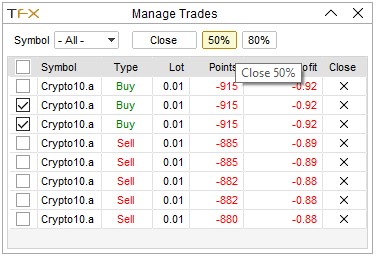
■ Close trades.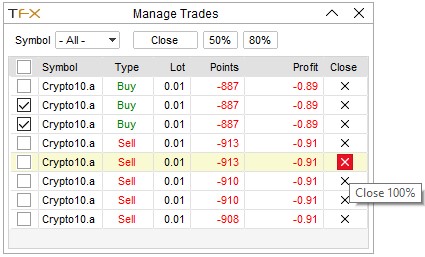 ■ Partial Close trades.
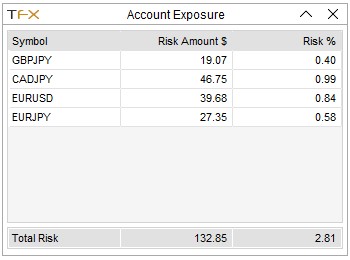
Account Exposure
■ View account exposure for each symbol to effectively manage your risk and overall exposure.
 Auto Break Even
■ Automatically move the stop loss to break even once the trade has gained a predefined number of points in profit.
Trailing Stops
■ Trailing stop options are available and can be configured in the settings.
(Press F7 to open options.)
Hot Keys
■ Esc – Show/Hide Risk Reward Tool. Also closes Trade Manager and Account Exposure windows.
■ Shift + Esc – Toggle Risk Reward mode between Buy and Sell.
■ Ctrl + 1 – Set Risk Reward Targets to 1.
■ Ctrl + 2 – Set Risk Reward Targets to 2.
■ Ctrl + 3 – Set Risk Reward Targets to 3.
■ Shift + E – Execute/Enter Order.
■ Shift + M – Open Manage Trades window.
■ Shift + X – Open Account Exposure window.
Advanced User Interface
■ Powerful Risk/Reward GUI tool that lets you calculate risk/reward and place trades with a single click—making trading smoother and stress-free.
■ Movable and minimizable windows to keep your chart workspace clean and organized.
■ Two built-in color themes designed to perfectly match both dark and light backgrounds.